Deploy Docker stacks.
No drama.
The simplest way to deploy and operate Docker Compose applications on your own servers. No Kubernetes. No lock-in. Just SSH, Bash, and Docker.
$ brew install gfargo/tap/strutWorkflow
Three commands.
That's it.
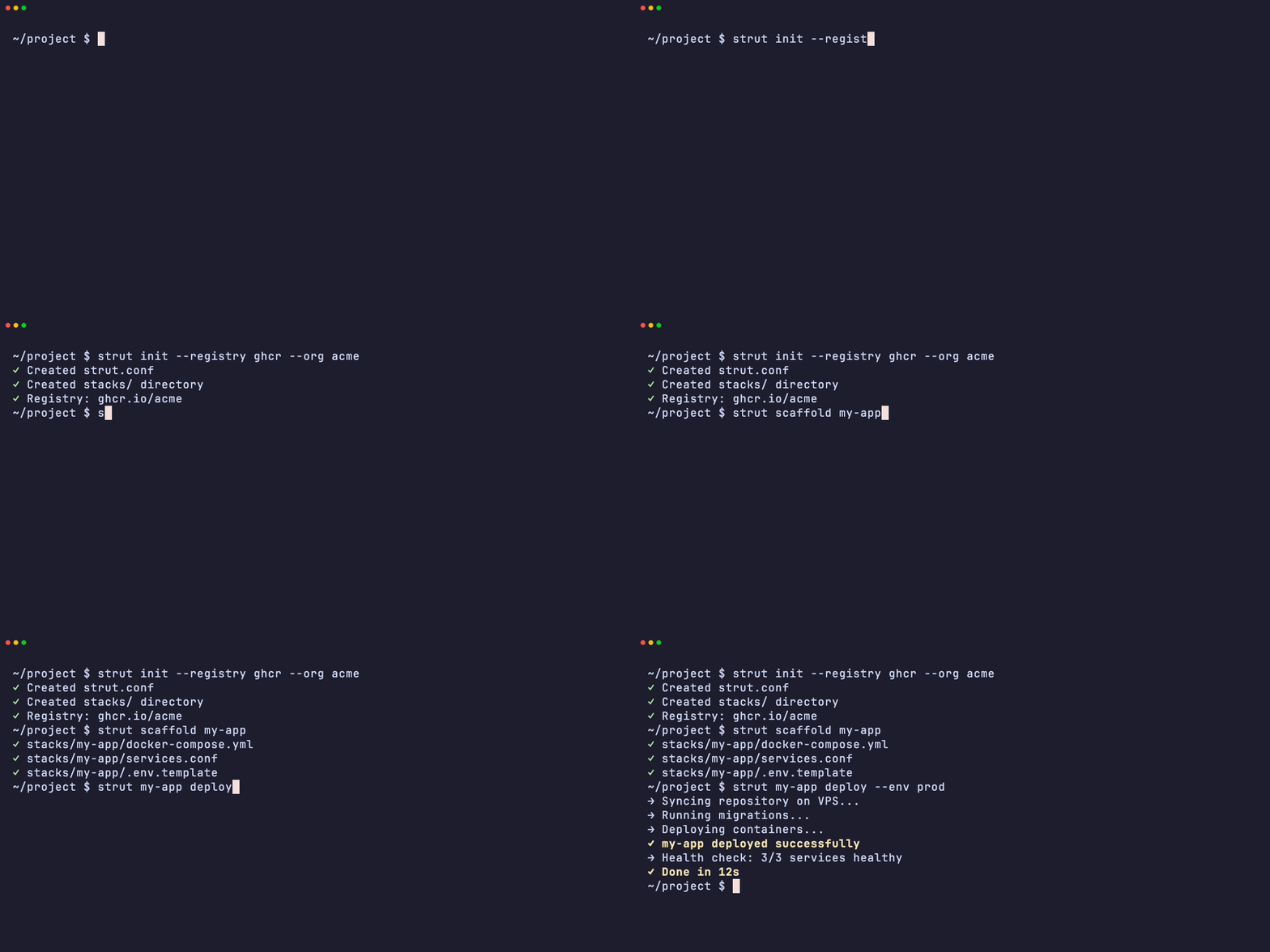
Initialize, scaffold, deploy. strut handles the rest.

In Action
See it work.
Real terminal recordings — the actual strut CLI, with scripted output.
Real infrastructure
Your servers.
Your rules.
No abstraction layers. No proprietary runtimes. strut works directly with Docker Compose over SSH — the same tools you already trust.
Capabilities
What you get.
Multi-Stack Management
Run multiple Docker Compose stacks on one VPS. Each stack gets its own config, secrets, and lifecycle.
One-Command Releases
Sync repo, run migrations, deploy containers, verify health. One command.
Database Backup & Restore
Backup Postgres, MySQL, SQLite, and Neo4j. Rehearse restores safely with --dry-run. Pull prod data locally for debugging.
Drift Detection & Fleet Sync
Compare local config to what's running. Detect stale image digests, see which hosts are behind origin, and bring your fleet in sync with one command.
Secret Rotation
Rotate SSH keys, API tokens, DB passwords. Update .env files and GitHub deploy keys in one go.
Health Checks
Configure per-service health checks in services.conf. strut waits for green before marking deploy complete.
Data-Loss Prevention
Dry-run mode, volume guards, and git clean protection. strut aborts before destroying data and tells you exactly why.
VPS Audit
Already have Docker containers running? strut audit scans your VPS and helps you convert to managed stacks.
Deploy Anywhere
If it has SSH, strut can ship to it.
Cloud VPS
DigitalOcean, Hetzner, Linode, Vultr — if it runs Linux and has an IP, strut can deploy to it. No vendor lock-in, no proprietary agents.
$ Raspberry Pi
Turn a $35 board into a production-grade Docker host. Home automation, IoT gateways, local AI inference.
$strut home-hub deploy --env piLocal Development
Mirror your production stack locally. Same configs, same commands. Catch issues before they hit prod.
$strut my-app deploy --env localHomelab Server
Old laptop, NUC, or rack-mount. Run Plex, Nextcloud, Pi-hole — each as an isolated strut stack.
$strut media-server deploy --env homelabClassroom Labs
Give every student their own stack. Scaffold once, deploy to each machine. Reset between sessions.
$strut scaffold student-envPreview Environments
Spin up a full stack per pull request on a shared staging VPS. Review, test, tear down.
$strut pr-42 deploy --env stagingEdge Nodes
Deploy containerized services to remote edge devices. Kiosks, sensors, retail POS.
$strut kiosk-app deploy --env edgeDedicated Servers
Colocated hardware, on-prem racks, or that beefy workstation under your desk.
$strut ml-pipeline deploy --env metalGame Servers
Minecraft, Valheim, Factorio — containerized and deployed to any box. Backup worlds, monitor health.
$strut minecraft deploy --env gamingNo proprietary agents · No cloud lock-in · Just SSH + Bash + Docker
Let your AI agent
run the show.
strut ships with agent steering and a skills library. One command installs context for your editor — then your agent knows how to deploy, backup, rollback, and debug without reading docs.
Install for your editor
$ strut skills install✓ Kiro: 9 skills → .kiro/skills/strut/
Reference procedures (loaded on demand)
MCP Server — let AI agents call strut directly
Beyond passive context, strut exposes 15 tools via the Model Context Protocol. Your agent can pull a one-call situation report, run a deploy go/no-go, inspect health, check drift, view logs, and deploy — without you copying commands.
$ strut mcp installWrites .kiro/settings/mcp.json — restart your IDE and strut tools appear automatically. Works with Kiro, Claude Code, and any MCP-compatible editor.
Agent Steering
Always-on context files that teach agents your conventions, architecture, and deployment patterns.
Skills Library
One comprehensive skill with 9 reference procedures — deploy, backup, debugging, drift, secrets, monitoring, and more. Loaded on demand.
MCP Server
Built-in Model Context Protocol server. AI agents can directly call strut commands — inspect health, deploy, check drift, view logs.
Works with any AI coding agent
Kiro, Claude Code, Cursor, Windsurf, Copilot, Zed, and Cline.
CI / CD
Push and forget.
Deploy on every push — two ways. Use the built-in webhook for instant VPS-side deploys with zero external dependencies, or the GitHub Action for CI pipeline integration.
- Built-in webhook: poll or HTTP — no CI runner needed
- Smart detection: only deploys stacks that changed
- HMAC signature validation for webhook security
- Or use the GitHub Action for pipeline-based deploys
name: Deployon:push: { branches: [main] }jobs:deploy:runs-on: ubuntu-lateststeps:- uses: actions/checkout@v4- uses: gfargo/strut-action@v1with:stack: my-appcommand: deployenv: prodhost: ${{ secrets.STRUT_HOST }}ssh-key: ${{ secrets.STRUT_SSH_KEY }}
Why strut
How it compares.
| Feature | strut | Coolify | Kamal 2 | Manual SSH |
|---|---|---|---|---|
| Time to First Deploy | Minutes | Minutes | Hours | Hours |
| Learning Curve | Low (Bash) | Low (GUI) | Medium | Low |
| Multi-Stack / Multi-App | ||||
| Database Backup Built-in | ||||
| Drift Detection | ||||
| Secret Rotation | ||||
| Health-Gated Deploys | ||||
| Dry-Run / Preview | ||||
| Git-Based Config | ||||
| AI Agent Skills | ||||
| MCP Server (AI Tools) | ||||
| No Web UI Required | ||||
| Works on Any VPS |
Available via add-on or extra configuration
strut: 13/13 features built-in
Who it's for
Who uses strut.
Solo Developer
You have a VPS, a Docker Compose file, and zero interest in learning Kubernetes. strut gets your app running with a real deployment workflow.
"I SSH into my server maybe once a month now."
Small Team
Your team needs a consistent way to deploy. strut gives everyone the same commands, same configs, same process. No more 'works on my machine.'
"New devs can deploy on day one."
Agency / Consultancy
You manage infrastructure for multiple clients. strut keeps each project isolated while using the same patterns everywhere.
"Same workflow for every client. Different configs."